How do I cancel my subscription?

If you're ever unhappy with DeepDyve, let us know and we'll do our best to fix that. If you're still unsatisfied, it's simple to cancel:

  1. Log in and go to your Account Settings page by clicking on your name in the top right, and clicking on 'Account Settings'.
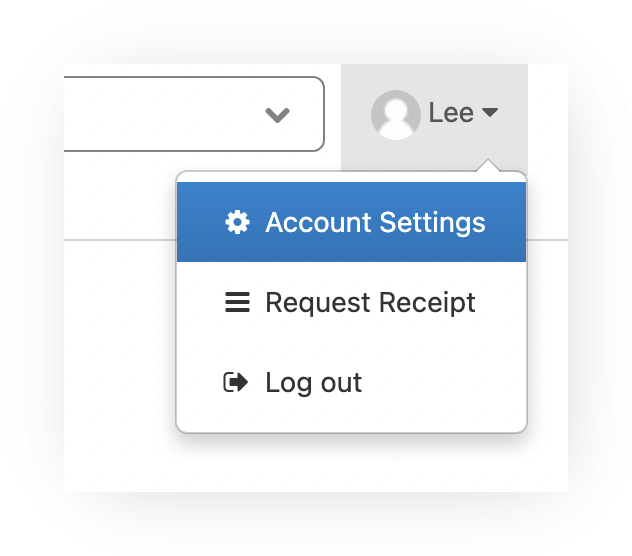
    Screenshot of the account menu opened by clicking your name (example 'Lee') in the top right, with 'Account Settings' highlighted above 'Request Receipt' and 'Log out'.

  2. Press the 'Cancel Subscription' button on this page.
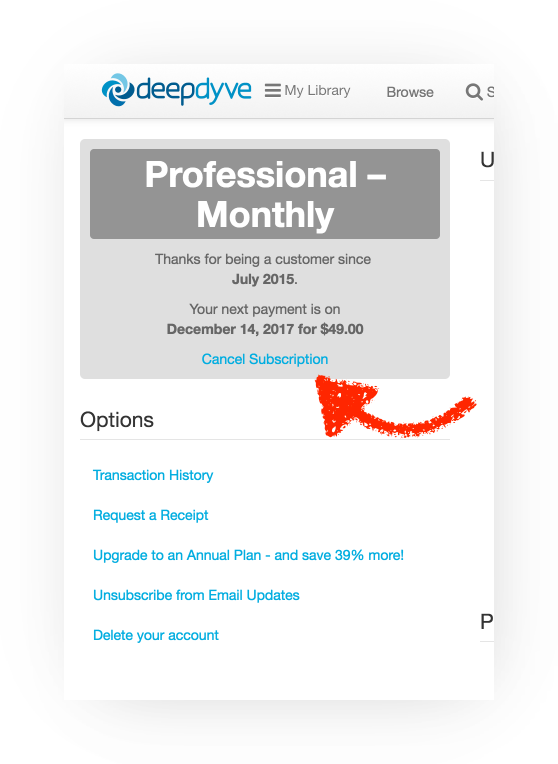
    Screenshot of the Account Settings page showing the subscription box ('Professional – Monthly', 'Thanks for being a customer since July 2015', next payment date and amount) with a red arrow pointing to the 'Cancel Subscription' link. Below, the Options list includes Transaction History, Request a Receipt, Upgrade to an Annual Plan, Unsubscribe from Email Updates, and Delete your account.

We're always trying to be better, so we'd really appreciate hearing if you have any comments or suggestions about why you're canceling.

Still need help? Contact Us Contact Us